CloudStack uses physical networks to separate different types of traffic within a zone. Each traffic type serves a specific purpose and can share or use dedicated network interfaces depending on deployment scale.
Overview
A physical network in CloudStack maps to one or more real NICs or bridges on the hypervisor hosts.
Each physical network can carry multiple traffic types.
Typical traffic types:
- Management
- Guest
- Public
- Storage
Public and Storage networks might not exist in every deployment. In small or test setups, all traffic types may share the same bridge.
Traffic Types
Management
Used for control-plane communication:
- Management server ↔ Hosts
- Hosts ↔ System VMs (Virtual Router, Console Proxy, Secondary Storage VM)
Isolation: Optional (can share interface with others in small labs).
Guest
Carries tenant VM traffic:
- Connects user instances to their isolated or shared networks.
- In advanced zones, this is where VLANs or VXLANs provide Layer-2 isolation.
Isolation: Layer 2 (VLAN/VXLAN).
Public
Provides external access:
- Public IPs for tenants (NAT, load balancing).
- Internet-facing interface of the Virtual Router.
Isolation: Layer 3 routing between VR and public network.
Storage
Used for storage operations:
- Copying templates, snapshots, and ISOs.
- Host ↔ Secondary Storage transfers.
- NOT used for primary storage transfers.
Isolation: Optional but recommended for performance.
Example: CloudStack Physical Network Configuration
Below is a sample screenshot from the CloudStack UI showing all traffic types (Guest, Management, Public, Storage) configured on a single physical network.
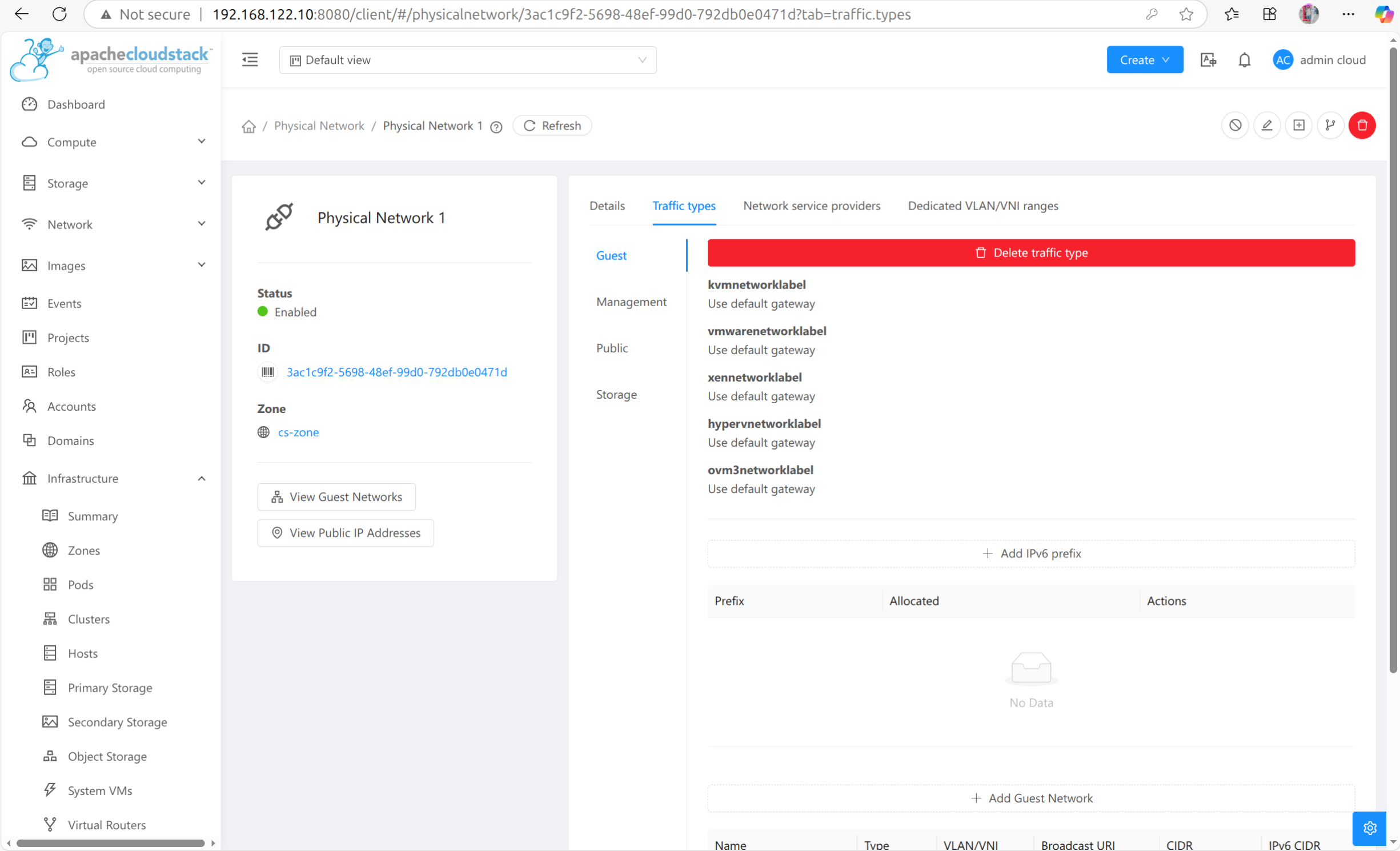
In larger production setups, these traffic types are split across multiple bridges or NICs for security and throughput.
Advanced vs Basic Zones
| Zone Type | Isolation | Virtual Router | Public Network | Use Case |
|---|---|---|---|---|
| Basic | Layer 3 (firewall rules) | Shared/global | Optional | Simple hosting |
| Advanced | Layer 2 (VLAN/VXLAN) | Per network | Required | Multi-tenant IaaS |
Key Takeaways
- Physical networks represent the underlying data paths CloudStack uses.
- Each network type (Management, Guest, Public, Storage) can be isolated or combined.
- Advanced zones introduce VLAN/VXLAN isolation and per-tenant Virtual Routers.
- Basic zones share a single subnet and use firewall-based isolation.